
Pediatric clinic software with growth charts built in
Plot weight, length or height, head circumference and BMI on WHO and CDC percentile curves, get an alert when a child crosses a percentile or leaves the normal range, and print the chart for the parents.
- Growth charts
- Percentile alerts
Weight chart1 / 3
Built for your specialty
What's built for Pediatrics
WHO and CDC curves
WHO from birth to 24 months for weight, length and head circumference; CDC from 2 to 20 years for weight, height and BMI, or let Tadawi choose by age.
Growth alerts
Out of range, a crossed percentile, growth speed and trend, each graded by how serious it is.
From birth
Enter the birth measurements on the Growth tab, and the curve starts where the child did.
Vitals at every visit
Weight, height, head circumference, temperature, heart rate, breathing rate, oxygen saturation and pain score.
A weight-based dose check
On plans with AI, the visit copilot checks doses against the child's weight, and allergies and duplicates, before you prescribe. It advises; you decide.
Children's teeth
If your clinic has the dental module, the dental chart shows the teeth a child has at their age, with a children's exam form and consent.
Growth charts
Growth, plotted at every visit
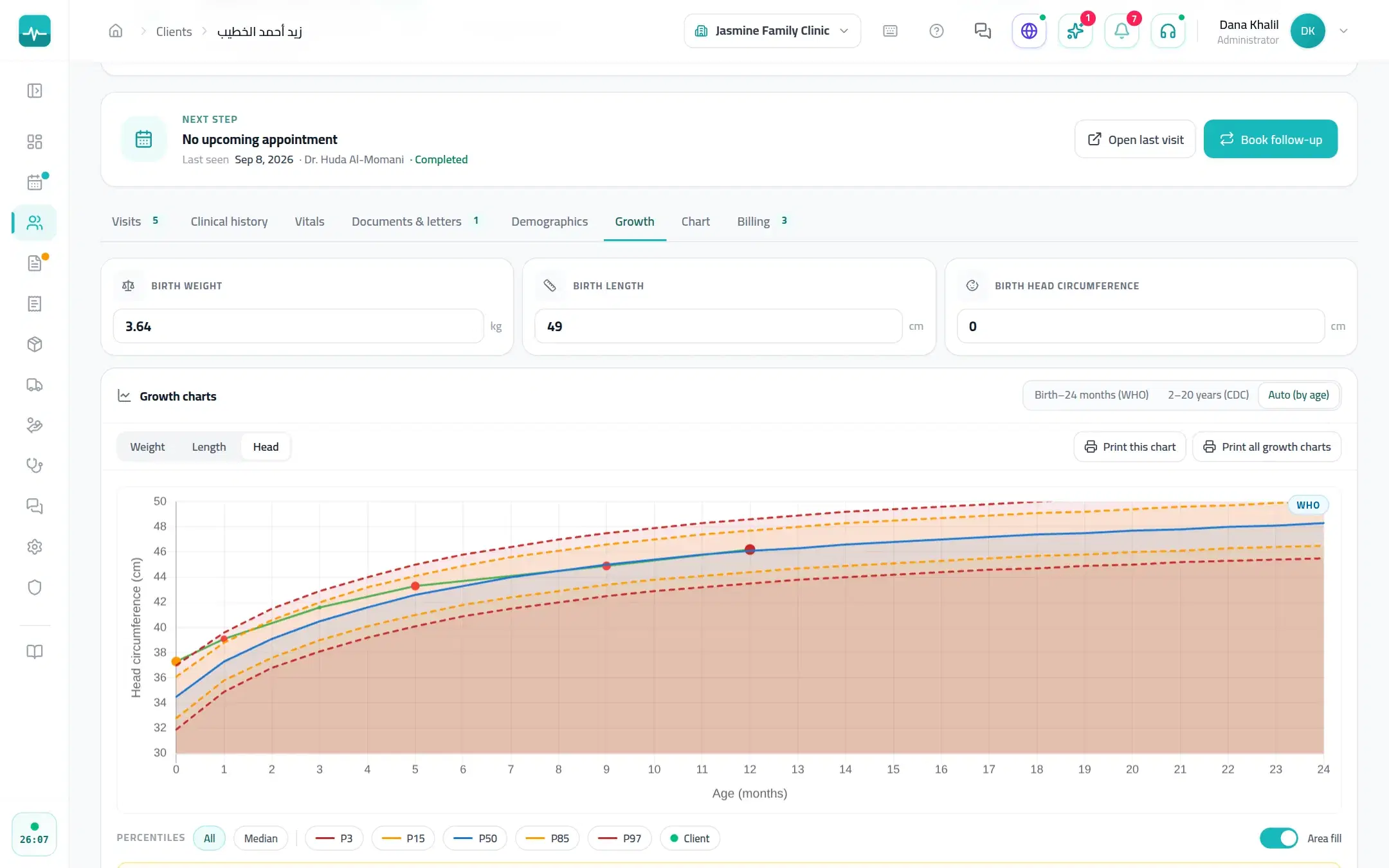
The Growth tab on the child's file plots each measurement on the percentile curves for the child's sex and age.
- P3, P15, P50, P85 and P97 curves for boys and girls
- Weight, length or height, head circumference and BMI
- Alerts graded by severity, beside the curve
- Growth charts print for the parents
A visit, step by step
How a visit runs
Measure
Weight, length or height and head circumference at check-in.
Plot
Each measurement lands on the WHO or CDC curve for the child's age.
Review the alerts
Crossed percentiles and slowing growth are flagged on the chart.
Share
Print the growth chart for the parents.
On every Tadawi clinic
And everything else your clinic runs on
The specialty tools sit inside the same Tadawi every clinic uses.
- SchedulingDay, week and all-doctor views, drag to reschedule, and a timer on everyone waiting.
- Online bookingPatients find you on Tadawi Connect and book the times you open, or send a request you approve.
- AI in the visitDictate the visit and get a safety check on allergies, duplicates and doses before you prescribe (on plans with AI).
- Prescriptions and lettersPrint or send prescriptions, sick leave and letters with your signature and a QR code to check them.
- Invoices and insuranceInvoices, payments and the insurer's share on the visit, plus packages, expenses and supplier bills.
- WhatsApp in one tapReminders, prescriptions and plans from ready templates, sent from the visit (on plans with WhatsApp).
Questions about Tadawi for Pediatrics
Run your clinic on Tadawi
Set up online, or book a demo and we'll walk you through it with cases like yours. Tadawi switches the specialty tools on for your team.